NexaGPU
What does an NVIDIA GPU server manufacturer actually do? The answer extends beyond assembling servers with graphics cards. A qualified manufacturer designs, integrates, tests, and supports systems built for demanding computational workloads. These workloads include artificial intelligence, scientific simulation, visual computing, and large-scale data analysis. The manufacturer must understand NVIDIA GPU architectures, server CPUs, memory channels, storage, networking, and thermal design. Every component affects performance.
A reliable nvidia gpu server manufacturer studies how a system behaves under sustained workloads. Engineers may monitor GPU temperatures, power consumption, fan speed, and application latency. They often use benchmark tests before delivery. A practical example is a rack server running multiple accelerators inside a controlled data center. Poor airflow can reduce performance, increase noise, and shorten component life. Small design decisions matter.
Trust also depends on evidence. Buyers should review testing methods, warranty terms, technical documentation, and support response procedures. Experienced manufacturers can explain compatibility limits instead of promising unlimited performance. That honesty is important. Some product comparisons remain incomplete, especially when workload data is unavailable. Real results can differ between training models, inference services, and simulation software.
The strongest manufacturers provide more than hardware. They help with deployment planning, driver configuration, system monitoring, and future expansion. Their teams should communicate clearly and follow recognized safety and quality practices. Still, no supplier is perfect. Cooling, software updates, and budget constraints can create difficult trade-offs. Understanding these details helps organizations choose a server partner with realistic expectations, measurable expertise, and dependable long-term support.
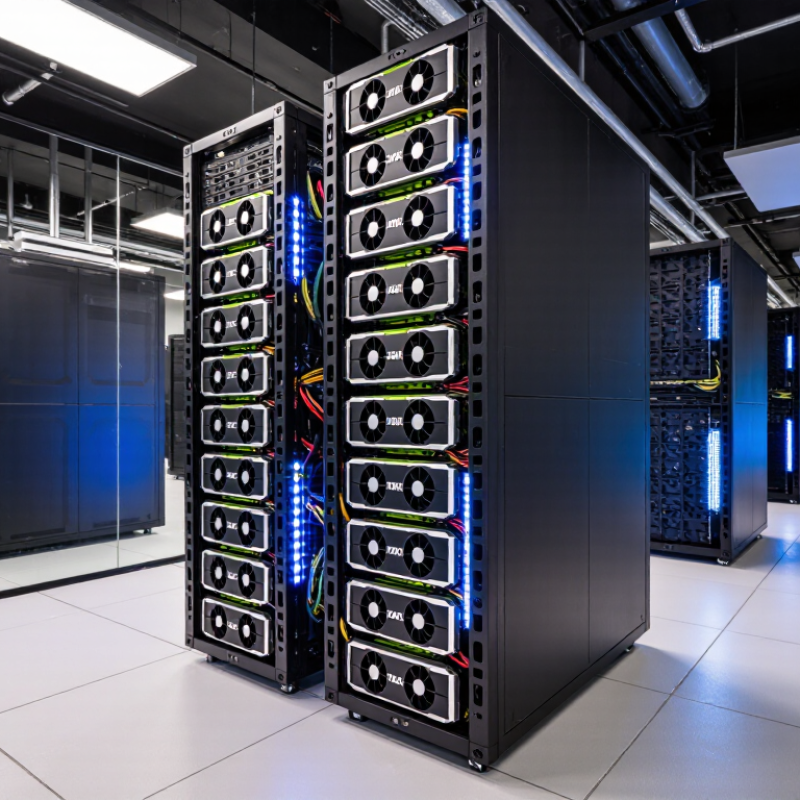
An NVIDIA GPU server manufacturer is a company that designs, assembles, and tests servers built to work with NVIDIA graphics processing units. It does not necessarily make the GPUs themselves. Its role is to bring together compatible components, including the chassis, motherboard, power supplies, networking, and cooling system. The goal is a stable machine that can handle demanding computing workloads.
Details matter. A dense server may fit several accelerator cards, but it also needs enough power and a clear path for hot air to escape. Manufacturers check component compatibility, update firmware, and test systems under sustained loads. They may also configure storage and networking for tasks such as AI training or scientific computing. Good documentation and responsive technical support are part of the work, not extras.
A specification sheet is only a starting point. Real workloads can expose heat, noise, or maintenance issues that short tests miss. Buyers should ask how systems are validated and what service is available after delivery. Not every manufacturer has the same testing depth, and a carefully chosen configuration can still need adjustment once installed.
A GPU server combines accelerators, host processors, memory, and fast networking in one carefully balanced system. The GPUs handle parallel workloads, while the host CPU manages tasks and feeds data to them. High-bandwidth memory keeps large datasets close to each accelerator. That can reduce delays, but memory capacity still limits the size of a model or simulation.
The links between GPUs matter, too. High-speed interconnects allow accelerators to exchange data without routing every transfer through the host. Standard expansion interfaces connect GPUs to the rest of the server, while network adapters move data between machines. Small design choices show up under load. A crowded chassis can trap heat, so engineers plan airflow, fan placement, and sometimes liquid cooling around the hardware.
Power delivery and software are just as important. Stable power supplies must handle sudden demand, and monitoring tools track temperature, utilization, and faults. Drivers and workload libraries help applications use the accelerators efficiently. Still, no configuration suits every task. A setup tuned for model training may waste energy on inference. That trade-off deserves a real workload test, not just a specification sheet.
A GPU server manufacturer turns compute components into a tested system, not just a rack of parts. Engineers match accelerators with CPUs, memory, storage, and high-speed networking. They check power delivery and airflow before final assembly. Details matter.
Integration becomes tangible inside the chassis. Technicians route power cables away from fan paths, fit heat sinks, and check each connection. Firmware settings, driver compatibility, and thermal limits are tested under sustained workloads. A short startup test is not enough. Burn-in testing can reveal overheating, unstable memory, or power faults that appear only after hours of use.
The International Energy Agency’s Electricity 2024 report estimated that data centres used about 460 TWh globally in 2022, with demand potentially exceeding 1,000 TWh by 2026. That makes efficiency and cooling practical design constraints, not decorative specifications. The Uptime Institute’s Global Data Center Survey 2024 also identifies power availability as a constraint on capacity growth. Cooling estimates can still be wrong. Real workloads vary, and a carefully validated system may need adjustments once deployed.
A GPU server manufacturer selects compatible components, integrates them into a chassis, and tests the assembled system.
Illustrative component counts for one example configuration—not industry averages or a universal server specification. Actual designs vary by workload and system requirements.
A GPU server combines multiple graphics processors, high-speed memory, and fast interconnects to handle parallel computing. In AI training, teams use these systems to process large datasets and adjust model parameters.
Stanford’s 2024 AI Index reported 149 notable foundation models released in 2023, with industry organizations producing 108. That growth increases demand for computing capacity. Not training alone.
Once a model is trained, GPU servers can support inference: generating answers, classifying images, or transcribing speech. They also power recommendation systems that rank products or videos in milliseconds.
In scientific research, GPUs accelerate simulations of molecules, weather patterns, and materials. Medical teams may use them to analyze scans, though clinical decisions still require qualified professionals and validated workflows.
The International Energy Agency’s Electricity 2024 report estimates data centers used about 460 terawatt-hours of electricity in 2022. It projects demand could reach 620–1,050 terawatt-hours by 2026. Those figures cover data centers broadly, not GPU servers alone.
Still, they make cooling, power efficiency, and workload planning practical design priorities. A GPU server is not automatically the best choice: simpler tasks may run more efficiently on conventional processors.
Choosing an NVIDIA GPU server manufacturer requires more than checking accelerator count. Examine whether the vendor validates the full system: GPU configuration, high-speed networking, memory capacity, firmware, and workload-specific performance. Ask for test results under sustained load, not just peak figures. Heat matters. A server that throttles during a long training run can miss deployment targets, even when its specification sheet looks impressive.
Power and cooling deserve close scrutiny. The International Energy Agency’s Electricity 2024 report estimated data-center consumption at about 460 TWh in 2022, potentially exceeding 1,000 TWh by 2026. That forecast makes rack density, power draw, and cooling design practical selection criteria. Request measured power and temperature data at your intended workload. Also check component availability, warranty coverage, spare-parts timelines, and the manufacturer’s process for diagnosing faults remotely. Some buyers overlook service response until a cluster is down. That is an expensive way to learn.
Tips: Request a reference configuration, a reproducible benchmark, and a written support escalation path. Compare results using your own model and data pipeline where possible. No checklist is perfect; benchmark conditions rarely match production exactly.
| Evaluation Factor | What It Covers | What to Look For | How to Verify It | Priority |
|---|---|---|---|---|
| GPU Platform Compatibility | Whether the server is designed for the selected GPU form factor, power requirements, interconnects, and supported system configuration. | Documented compatibility for the exact GPU configuration, including the number of accelerators supported and any configuration limits. | Request the system configuration guide and confirm the proposed build against the GPU and server platform documentation. | Essential |
| Power Delivery | Power supplies, cabling, distribution, and input requirements needed to operate the configured server reliably. | Power capacity appropriate to the full configuration, clearly stated input requirements, and documented redundancy options where applicable. | Compare the server’s rated power specifications with the planned GPU, CPU, memory, and storage configuration. | Essential |
| Thermal Design | Cooling capability and airflow management for high-density GPUs and other heat-producing components. | Published operating conditions, a clear airflow design, and cooling options suited to the intended data-center environment. | Review thermal and environmental specifications; ask how the system is validated under sustained workloads. | Essential |
| GPU Interconnect and Networking | Communication pathways among GPUs and connectivity between servers, storage, and the wider cluster. | Clear details about supported GPU interconnect topology, network adapter options, link speeds, and expansion capacity. | Request a topology diagram and check that the proposed network design matches the application’s communication needs. | High |
| CPU, Memory, and Storage Balance | How host processors, system memory, and local storage support GPU workloads without creating avoidable bottlenecks. | Configuration options suited to the workload, adequate memory capacity, and storage choices for datasets, checkpoints, and system software. | Review the bill of materials and compare it with the workload’s data size, throughput, and software requirements. | High |
| Software and Driver Support | Compatibility with operating systems, GPU drivers, libraries, virtualization, and cluster-management software. | A published compatibility approach, access to installation guidance, and a process for handling software updates. | Request a supported-software list and confirm the intended operating system and workload stack before purchase. | High |
| Validation and Testing | Factory checks and system-level testing performed before shipment. | Documented burn-in or stress testing, component checks, and configuration-specific acceptance procedures. | Ask for the standard test scope and sample completion records with sensitive information removed. | High |
| Service and Warranty | Warranty coverage, response channels, replacement procedures, and access to qualified technical support. | Written coverage terms, defined support hours and response targets, and a clear process for parts replacement and escalation. | Review the warranty and support agreement, including service location, exclusions, and expected parts availability. | High |
| System Management and Security | Remote monitoring, hardware management, firmware controls, and security-related configuration options. | Documented management interfaces, update procedures, access controls, and a way to monitor system health. | Request management documentation and confirm that the features align with the organization’s security policies. | Medium |
| Lifecycle and Supply Planning | Availability of the proposed configuration, component substitutions, lead times, and long-term maintenance planning. | Transparent lead-time estimates, written approval for substitutions, and clear communication about configuration changes. | Ask for a dated quotation and confirm how component changes, delivery delays, and future maintenance are handled. | Medium |
| Total Cost of Ownership | Costs beyond the purchase price, including power, cooling, networking, support, and deployment. | A complete cost breakdown and assumptions for operating conditions, service coverage, and required infrastructure. | Compare proposals using the same configuration, support period, power assumptions, and deployment scope. | Medium |
It designs, assembles, and tests servers around compatible graphics processors. It may not make the processors itself.
The chassis, motherboard, power supplies, processors, memory, storage, networking, and cooling system must be compatible. Small mismatches can matter.
Technicians check connections, firmware, driver compatibility, and thermal limits. They may run systems under sustained workloads to expose faults.
A brief startup test may miss overheating, unstable memory, or power faults. Hours of testing can reveal more.
Ask how airflow and heat are tested in the intended configuration. Dense systems need clear paths for hot air to escape.
GPU servers can require substantial power, and limited capacity may restrict deployment. Cooling estimates can also miss real-world conditions.
Yes. Workloads vary, so a system may need adjustments after installation. No test catches everything.
Look for clear documentation and responsive help after delivery. Ask what service is available before choosing a system.
An nvidia gpu server manufacturer designs and produces computing systems built to support demanding workloads that rely on graphics processing units. These servers combine accelerators with suitable processors, memory, high-speed interconnects, storage, and networking. Their performance depends not only on the components themselves but also on how effectively they work together. Cooling, power delivery, system management, and software compatibility are important technologies and design considerations.
Manufacturers build and integrate systems by selecting compatible parts, assembling and configuring them, and testing performance, stability, and thermal behavior. The resulting servers can support artificial intelligence, machine learning, scientific computing, data analysis, and graphics-intensive applications. When evaluating a manufacturer, consider its engineering expertise, customization options, quality assurance, documentation, technical support, and ability to meet workload, reliability, and expansion needs.
